Most movies you movie your self have one drawback: the digicam by no means strikes. Even with a tripod to stabilize the shot, after just a few seconds, the clip can really feel fairly flat.
Movies with an expert contact are extra interesting to look at. As a result of it entails following the topic, zooming on vital issues, and shifting the scene. However what if all the pieces is already shot?
That’s the place digicam monitoring comes into play. It permits you to introduce movement throughout modifying, somewhat than having to reshoot. On this information, we’ll let you know the way it works, break down the steps, and offer you 6 simple methods to boost your movies.
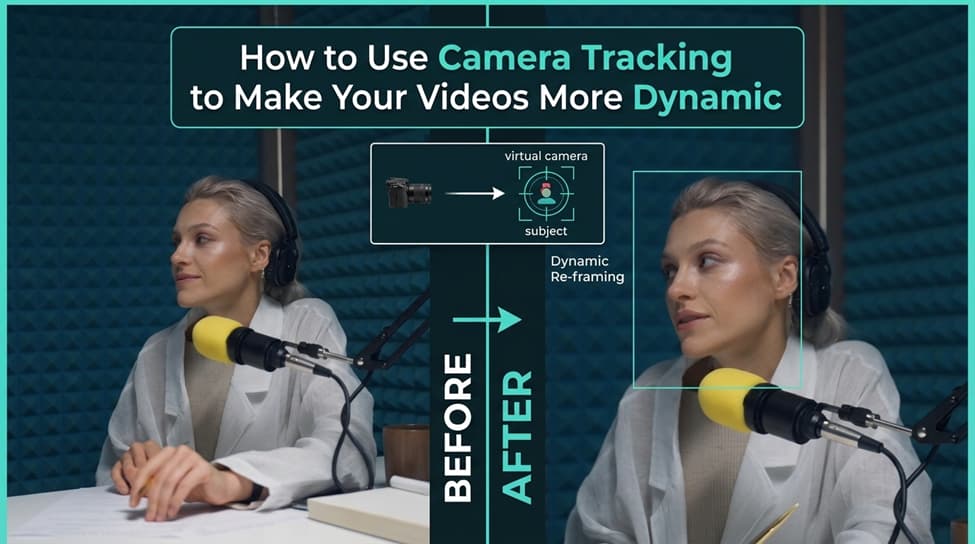
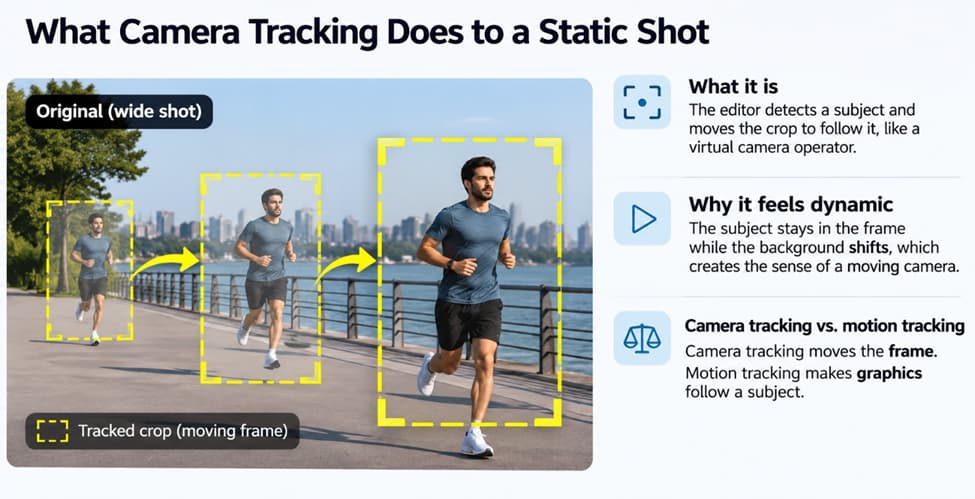
What Digital camera Monitoring Does to a Static Shot
Digital camera monitoring converts a static shot taken with a digicam right into a shifting digicam shot. The editor ‘trails’ the shot to match the motion of a given goal.
Say you might be strolling throughout the room; for example, your body can merely comply with you somewhat than displaying the entire room to you. For you, it is going to appear to be extra like a true-life video.
Digital camera monitoring vs. movement monitoring: Digital camera monitoring strikes the body to trace your topic. Movement monitoring strikes textual content, stickers, or different objects together with one thing within the video.
The Device We’ll Use: Filmora Digital camera Monitoring
Let’s get began with modifying movies! This tutorial makes use of Wondershare Filmora, a desktop video editor that helps Mac and Home windows.
Right here’s the factor: Automated digicam monitoring will comply with shifting topics and make sure that they keep in-frame – all with out manually keyframing.
Filmora gives three monitoring modes:
- Head Monitoring: Locks onto an individual’s head. Very helpful in interviews, classes, and talking-head footage.
- Physique Monitoring: Tracks motion of all the physique. Good for strolling movies, dances, sports activities, and exercises.
- Customized Goal: Select what to trace, from pets to merchandise to a shifting topic.
Moreover, Filmora permits you to simply excellent your output: You’ll be able to see a preview of the monitoring, reposition the framing, or clear the outcome and do the monitoring once more.
And the best a part of all? You’ll be able to cut up, trim, resize, and replica the supported tracked clips with out eradicating the monitoring outcomes. So, there isn’t any have to re-apply the monitoring.
Different Monitoring Options of Filmora
Auto Topic Monitoring
It’ll monitor the motion of the topic, robotically maintaining them in body. If an individual walks throughout the room or at a speaker’s tempo whereas giving a presentation, the topic stays extra in body with computerized monitoring.
Clean Digital camera Motion
Make your “Observe the Digital camera” movies a cinematically vigorous expertise. Filmora seamlessly pans on objects as they transfer, so strolling vlogs, health tutorials, and product evaluations may have an expert, enticing look.
Preview and Modify Monitoring
As soon as the monitoring is finished, take a look at how your image appears to be like and, if vital, modify the framing. A number of the supported adjustment parameters offer you a real-time preview so to make adjustments and see the outcome immediately.
After monitoring, it’s also possible to cut up, trim, resize, and replica clips whereas retaining monitoring outcomes for supported objects. Filmora offers a number of monitoring options which might be easy to make use of, together with Movement Monitoring, Planar Monitoring, Auto Reframe, and extra.
Step-by-Step: Add Digital camera Motion to a Tripod Shot
Would you want your nonetheless footage to look livelier? Right here’s a three-step information on make the most of the Digital camera Monitoring operate in Filmora.
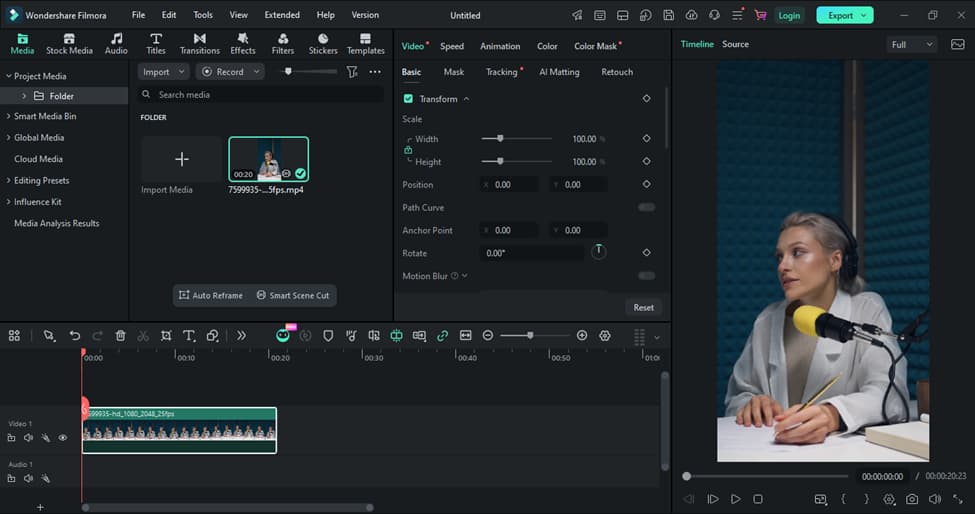
Step 1. Add and Import Your Video into Filmora
Launch Filmora in your pc, arrange a New Mission, then click on Import and select the file to add your video.
Step 2. Digital camera Monitoring Mode Choice
To run digicam monitoring from the chosen clip, simply click on Video > Monitoring > Digital camera Monitoring.
Activate the digicam monitoring characteristic and select which one amongst Head, Physique, or Customized you want monitoring to comply with.
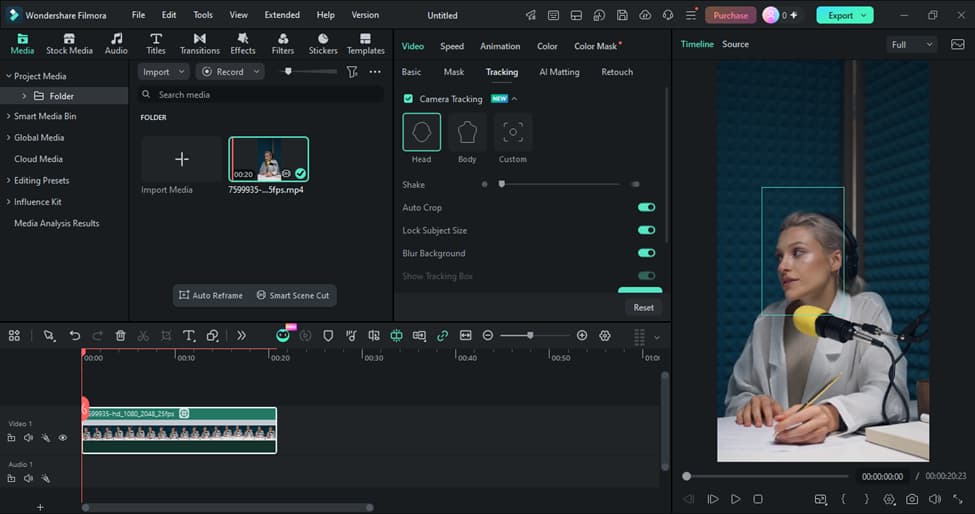
Modify the settings, then click on Begin. Throughout the course of, the software program will be capable of detect the movement after which transfer the body to maintain up with the motion.
Step 3. Watch the Video, Modify Digital camera Settings, and Export It
After finishing the digicam monitoring operate, you may play the video to see if the digicam strikes with the topic very easily from nook to nook.
6 Methods to Use Digital camera Monitoring for Extra Dynamic Edits
Digital camera monitoring isn’t solely about monitoring a shifting topic. You should utilize it to change between completely different digicam angles, to give attention to particular photographs, and to brighten up easy footage.
1. Make a Observe Shot
Make the most of Physique Monitoring to trace somebody strolling within the body. Having the individual at all times within the heart of the shot offers the feeling of a shifting digicam in a nonetheless large shot.
Strive it on: Journey vlogs and retailer walkthroughs.
2. Swap Between Huge and Shut-Up Photographs
Duplicate your tracked clip however depart one model large and zoom in on the opposite. Minimize between the 2 to offer an impression of two digicam angles, despite the fact that it was shot in a single.
Strive it on: Tutorials and interviews.
3. Change Framing at Essential Moments
Break it when your tracked clip hits a key second, like a humorous face or a product reveal. Zoom in for that second to assist preserve viewers’ consideration.
Strive it on: Product reveals and storytelling movies.
4. Go away Area in Entrance of Shifting Topics
Transfer the framing so there’s some area in entrance of the shifting topic somewhat than completely within the center. Simply that little little bit of area is sufficient to make motion appear extra pure and cinematic.
Strive it on: Working, biking, and dancing movies.
5. Preserve Merchandise in Focus
Use Customized Goal monitoring to comply with the product once you seize it, rotate it, or transfer it throughout the desk. The body will comply with the product in order that the viewer can give attention to the product.
Strive it on: Unboxing movies and product demonstrations.
6. Mix Digital camera Monitoring With B-Roll
Flip between your tracked essential video and nonetheless B-Roll footage. As an illustration, I’ll video myself strolling via a retailer, then reduce away to close-up photographs of merchandise. This provides visible curiosity to the completed piece.
Strive it on: Journey movies, product evaluations, and life-style content material.
Frequent Errors That Make Digital camera Monitoring Look Pretend
Digital camera monitoring will be very efficient, however just a few errors can spoil the shot.
Utilizing low-resolution footage: Once you zoom in an excessive amount of, low-resolution video will look blurry. If potential, use high-resolution footage.
Dropping the topic: If a topic strikes off solely, then the monitoring could fail. Crop that space out of the shot or monitor once more.
Monitoring in busy scenes: Filmora could comply with the mistaken individual or object. Select what you want to monitor with Customized Goal.
Cropping too tight: A really shut crop makes all the pieces small appear like a shake or a tremor. It’s a good suggestion to go away a bit area round your topic that enables the monitoring to look clean.
You don’t essentially must shoot solely on monitor. You need to combine shifting photographs and stuck photographs to emphasise the highlights of your video.
Filming Suggestions That Make Monitoring Simpler
Good digicam monitoring begins with good footage. Listed here are just a few easy tricks to get higher outcomes:
- Shoot with more room: Give further area to your topic so you may crop and modify the body. Document in 4K if potential.
- Even lighting: Illuminate your topic effectively so the monitoring characteristic can decide up actions sooner.
- Topic in view: Be sure that the individual or merchandise stays throughout the unique body till the tip of the clip.
- No sturdy backlight: Capturing your topic towards the sunshine would possibly make the individual too darkish and fewer trackable.
- Select a easy background: Keep away from crowded backgrounds which may confuse the tracker or trigger it to comply with the mistaken object.
Closing
There’s no want for pricey digicam tools to get extra selection in your movies. Merely add one tripod shot and add digicam monitoring to convey you ahead, backwards and aspect to aspect in a single take. Wish to strive it out? Use your most static video from final week and swap between large photographs and close-ups. Follow utilizing this simple device to seize your viewer’s consideration.